Apk Market

Download Android Apps,Games,Live Wallpapers & Themes

Popular Posts

Showing posts with label Media. Show all posts


DroidIris+ v2.3.1 play.google.com.droidiris.plus
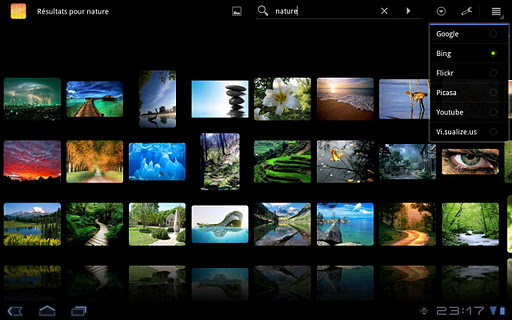
Search and browse thousands of images online with this superb and smooth 3D gallery.

Browse my media :
   + SD card
   + Picasa albums
   + Facebook personal and friends albums

Search with your favorite engine:
  • Google, 
  • Bing
  • Youtube,
  • Picasa,
  • Flickr,
  • Visualizeus,
  • DeviantArt
Other Features :
  • Works on Android 2.1+ and is optimized for Honeycomb tablets
  • Intuitive multi-touch gestures : scroll, fling and pinch to zoom
  • Save, set as wallpaper and share images you like
  • Integration to global search
  • Create home shortcuts to favorite search
What's in this version : (Updated : Apr 4, 2012)
  • Fixed Facebook browsing
Required Android O/S : 2.1+


Download : 240Kb APK
  
Read More »


DicePlayer v2.0.1 play.google.com.inisoft.mediaplayer.a
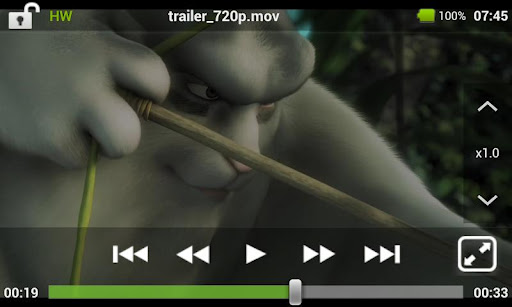
Diceplayer is a HW accelerated Media player for android ! Diceplayer uses HW video decoder at various containers and audio codecs combination. Diceplayer drains less bettery than SW based players.

Features :
  • Formats - AVI,MOV,MKV,FLV,AVI,3GP,3G2,ASF,WMV,MP4,M4V,TS,MTP,M2TS
  • Playback speed control
    • up to x1.8
    • audio pitch correction support
  • Subtitle format
    • SSA,SMI,SRT
    • MKV embedded subtitle supported
    • Unicode/Multibyte charset supported.
  • Transport
    • HTTP
    • RTP/RTSP
    • HTTP Live Streaming
Supported devices
  • Tegra2 based Honeycomb tables
  • Samsung Galaxy S2/Note
  • Samsung Galaxy S and variants
  • Samsung Galaxy Tab(7')
  • Samsung Galaxy Player (YP-GB1)
  • HTC Nexus One,Desire and QSD8250 based devices => may need libOmxVdec.so patch. 
  • HTC Sensation,Evo 4G+.Evo 3D
  • HTC Desire HD,ThunderBolt
  • Toshiba TG-03 and many Japaneses vendors' QSD8250 based devices => May need libOmxVdec.so patch. 
  • Dell Streak,Venue => May need libOmxVdec.so patch. 
  • SonyErricson Xperia Arc,Acro
  • Motolora Defy : Gingerbread required.
  • LG Optimus 2x,Moto Atrix,Droid Bionic,Photon 4G : Gingerbread required
What's in this version : (Updated : Apr 26, 2012)
  • What's in this version:Change UI Look & Feel of list
  • Support media scanned folders
  • Enhance performace of Software Player
  • Support background playback (on/off in settings)
  • Support volume boost (on/off in settings)
  • Fix the bug that not hide navigation bar on some ICS devices
  • Fix the flickering issue on some ICS devices

Required Android O/S : 2.2+


Download : 5.2Mb APK
Read More »


ZPlayer v3.1.5 play.google.com.wpmusic
Welcome to ZPlayer a Windows Phone 7 / Zune themed player, a better richer and more interactive media player.
Get album reviews, artist biographies, top tracks, playlists, related artists and podcasts (audio/video) all in one application.

+ Swiping the homescreen to the left/right shows the 'current playing' song and listening history. 
+ To jump to the 'now playing' screen, use the volume controls to reveal the music controls, and then tap on the song name(in bold) or the artist name.

Now with more widgets, fast forward and rewind controls, headset controls home screen customization, equalizer, audio effects. You can start with your own media, and learn about other artists, other tracks and what other people are listening too. Pair this media player with a last fm account and submit likes, now playing status, and scrobble tracks.

Note:
The Application uses android framework Audio Effect API, this API was introduced since android 2.3. Therefore only devices that have at least Android version 2.3 will be able to take advantage of this feature.

if you use a third party equalizer that controls the output mix for all media playing on the device, disable it before using this application. This application needs to control its own audio effects.
* audio effects implemented include Equalizer, Bassboost and Virtualizer based on Android 2.3

What's in this version : (Updated : Apr 28, 2012)
  • bug fixes
  • ics tweaks
  • added long click actions for tracks in all screens
  • adjusted homescreen text size
  • added 'single tap' setting to play albums from homescreen
Required Android O/S : 2.1+


Download : 2Mb APK
Read More »


MX Video Player Pro v1.6c play.google.com.mxtech.videoplayer.pro

Required Android O/S : 2.1+

MULTI-CORE DECODING - MX Video Player is the first Android video player that performs multi-core decoding. According to the test results on dual-core devices, it shows up to 70% performance improvement than single-core devices.

CPU OPTIMIZATION - Provides highly optimized CODECs and Rendering Engines for the processors including ARM® NEON™ and NVIDIA® Tegra™ 2.

MULTI-TOUCH VIDEO ZOOM CONTROL - Zoom while playing your video in and out using multi-touch gestures.

SUBTITLE SCROLL - Scroll on subtitle text and playback position will be adjusted to match previous or next subtitle timing.

BETTER SUBTITLE READABILITY - Increased subtitle readability with thicker border and shadow around text.

FULL HONEYCOMB SUPPORT

Supported File Types :
  • SubRip(.srt) 
  • Sub Station Alpha(.ssa/.ass) 
  • MicroDVD(.sub/.txt) 
  • SubViewer2.0(.sub) 
  • SAMI(.smi/.sami) 
  • MPL2(.mpl/.txt) 
  • PowerDivX(.psb/.txt) 
  • TMPlayer(.txt) 
  • Matroska (.mkv) Subtitle Track. (text, ass/ssa only) 
What's in this version : (Updated : Apr 21, 2011)
  • Increased maximum volume of S/W audio to 200%
  • Improved text subtitle drawing speed.
  • Improved integrity checking of internal modules.
  • Added options for on-screen elapsed time, battery/clock display; Background color and Bottom placement.
  • Added support for .mov text subtitle.
  • Added shuffle/loop option. (Long click the next video button)
  • Added border thickness option for text subtitles. (except SSA)
  • Added fade-out option for subtitle text.


Download : 4.1Mb APK
http://filemac.com/m203gamscomf.html MX Video Player Pro v1.6c
Read More »


RD3 HD - Groovebox v1.5.2 play.google.com.mikrosonic.RD3X

Required Android O/S : 2.1+

Use your Android phone or tablet as a musical instrument and make your own electronic music tracks!
Recreate the sound of early electronic dance music with the RD3 HD – Groovebox that recalls two 303-style analog synthesizers, a drum machine plus reverb, distortion, phaser, filter and delay audio effects!

Developed in Berlin, RD3 HD - Groovebox is a pioneering audio app that lets you program your own grooves. This multi-touch enabled app makes it simple to invent unique loops and manipulate them with resonant filters and effects on the go.

Appropriate both for experienced musicians and novices.

Use it for live performances in landscape mode on phones and 7-inch tablets or use the additional special rack view on 10-inch tablets in portrait mode.

RD3 HD is optimized for Android 2.3 (Gingerbread), 3.X (Honeycomb) and Android 4 (Ice Cream Sandwich).

Loops you've created and exported with the Groovebox can also be automatically integrated into mikrosonic's audio mixer app SPC - Music Sketchpad.

Features:
Channel mixer/sequencer:

  • Volume control with level meter
  • 4 bars with 16 steps per instrument
  • 3 play modes: Solo, loop or random
  • Channel mute
Two virtual analog synthesizers:
  • 4 types of waveforms for each synth
  • Reminiscent of the legendary 303 synthesizer
  • High-quality or regular filter modes
  • Real-time step sequencer for each synth
  • Free assignable audio effects
Drum machine with:
  • 10 drum kits: 808, 909, 606, CR-78, Linn, KR55, RX11, RZ1, DMX, DPM48
  • Channel mute
  • Punch control for volume and envelope adjustments
  • Accent programmable for each drum channel
  • Free assignable effects for each drum sound
  • Real-time step sequencer
Audio effects:
  • Reverb, distortion, filter, phaser and delay
  • Real-time controllable
  • X/Y control field for each effect
  • 4 effect sends
  • Chaining of 2 effects
Technical features:
  • Special rack view in portrait mode for 10-inch tablets
  • Multi-touch control
  • Live session recording
  • Audio loop export feature
  • SoundCloud Sharing Kit integration
  • Session save capability
  • Cut/copy/paste pattern
  • OpenSL support
  • App2SD
What's in this version : (Updated : Apr 18, 2012)
  • Fixed: Export of 4 bar loops (version 1.5.2)
  • Optimizations for Tegra 2 cpu's (version 1.5.2)
  • Enhanced effect section
  • 5 audio effects: Reverb, delay, phaser, filter and distortion
  • Real-time controllable effects with X-Y control field
  • 4 effect sends
  • Chaining of effects
  • Drum machine improvements
  • Mute button for each drum channel
  • Individual accent settings for each drum channel
  • New demo songs
  • Bugfix: Energy settings restored when sending app to background
  • OpenSL bugfixes
  •  Screen resolution 800×480 (WVGA) or higher
  • 800 MHz CPU or faster supporting ARMv7


Download : 3Mb APK
Read More »


Organize Your Photos and Videos !


Media Organizer Photos/Videos v1.6.0 play.google.com.mediaorganizer
Media Organizer is the best way to manage your photos, pictures and videos directly from your gallery application.
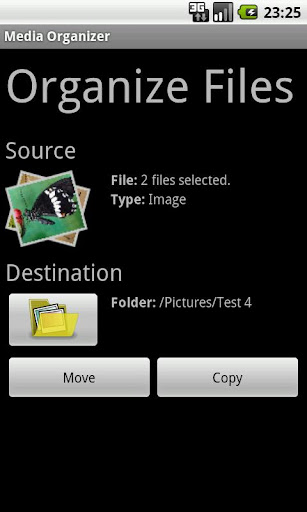
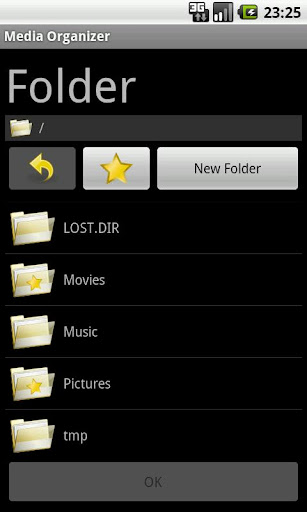
Media Organizer allows you to organize your photos and videos into folders which will then show up as albums in your media gallery. It supports your external storage (SD card) to create albums on it.

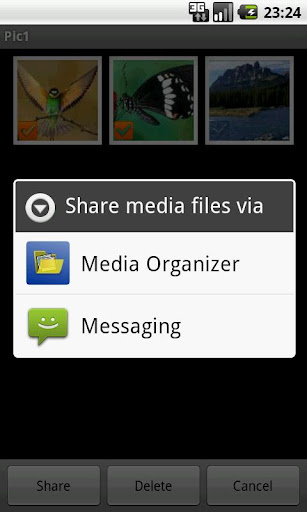
MediaOrganizer is not a standalone application but integrates with your gallery app (e.g. Gallery, Gallery3D or HTC Sense Album) and is started out of the gallery by sending pictures or videos via “Share” or “Send To”.

Features:
  • Copy or move your pictures, photos and videos into folders directly from your Gallery via “Share” or “Send To”
  • Select multiple files in your gallery and move or copy them at once
  • Create new folders on your external storage
  • Delete and rename your folders on the external storage
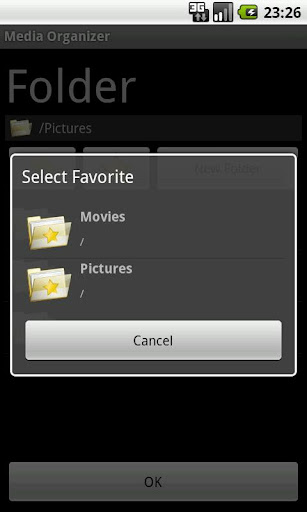
  • Maintain a list of favourite folders for quick access
  • Hide or unhide your pics and vids (if the gallery supports ".nomedia")
MediaOrganizer is available in English, German and Polish localization. Compatible with Honeycomb tablets.

Note: The standard gallery of the Xperia Mini does not support folders. You have to use an alternative gallery application to see the folders.

What's in this version : (Updated : Mar 20, 2012)
  • Improved media scanner.
  • Full history: http://marinits.net/cms/android-2/media-organizer-release-notes?lang=en
Required Android O/S : 2.2+
  
 
Read More »


Akimbo Audiobook Player v1.5.5.01 play.google.com.akimbo.abp
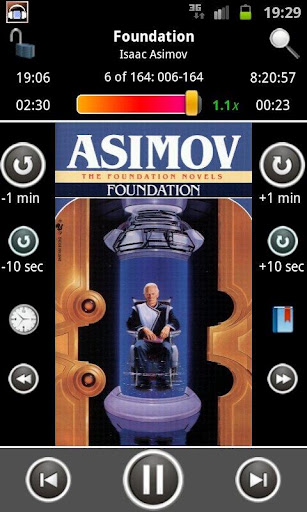
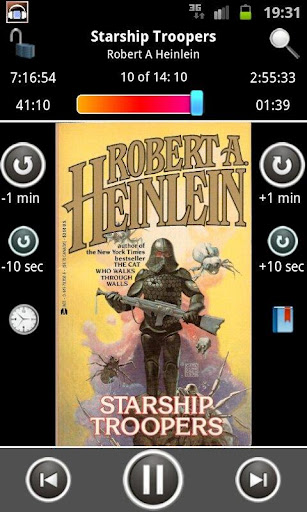
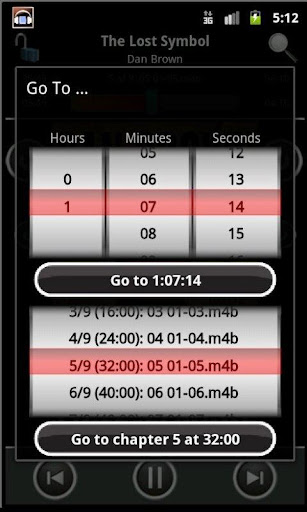
It is specifically tailored for audio book formats (M4A, M4B, MP3) and comes equipped with various features such as: identify chapters and covers in all types of books; maintain position and volume per book; partial speed control support (see below); allow numerous ways to change your position (from configurable step button to a “go to any position” dialog), bookmarks and more…

IMPORTANT NOTE: due to the differences in audio capabilities between different Android OS versions and device models, it is recommended you install the trial version before using this application, to ensure that your audio files are playable on your device: https://market.android.com/details?id=com.akimbo.abp.trial

Notable features:
  • Supports all the major audio book and other audio formats: M4A, M4B (including iPod chaptered books), MP4, MP3, ogg vorbis.
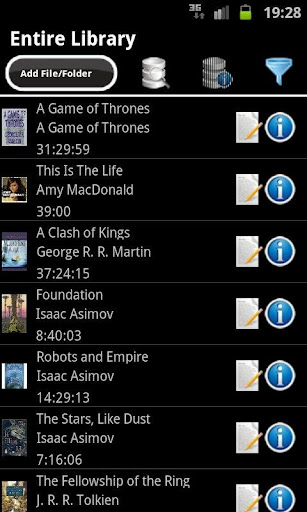
  • Reads cover images and chapter information from within audio book files.
  • Parses WMA and FLAC (actual ability to play depends on your device).
  • Maintain your last position and last set volume level for each book.
  • Partial play speed control (IMPORTANT: requires purchase of Presto app and is limited to MP3 and OGG formats, will not work on M4B books).
  • Allows bookmarks for each book.
  • Configurable step buttons for quick shifts forwards or backwards.
  • Easy to use “go to” dialog that will take you instantly to any chapter or position throughout the book.
  • Home Screen Widget.
  • Allows a one-click automatic download of covers for any book, or for your entire library at once.
  • A configurable “lock” mode, which prevents accidental changes of position during play.
  • Sleep Timer, pausing play after a specified time.
  • Loads your entire library at once: offers a one-click scan of any folder tree on your device.
  • The player screen offers a host of accessibility and experience improving features, including large-font and human voice indication (and approval) for your actions.
  • Allows undoing and redoing any accidental change in position while listening.
  • For easy listening to your audiobook without looking at the screen (while engaged in some other action or for the visually impaired) it offers a range of accessibility features (including human voice indications) as well as an option to lock the player against accidental changes.
The player is highly recommended not just for audiobooks, but for any episodic format, such as music albums or podcasts.

A note on permissions:
  • Internet access is only done at your express request to download covers (it is never launched without a user pressing the download cover button). No personal information is ever sent outside your phone.
  • Access to your phone’s state is required to pause the player when a call comes in. No other use of this permission is made.
  • Writing to the external storage is required if you choose to save the app’s data (library, images, etc.) on the SD card, instead of the device’s internal storage. No other use of this permission is made.
  • Battery status and wake lock permissions are used to prevent locking the device (when configured by the user) when playing or when playing while connected to a power source.
What's in this version : (Updated : Apr 1, 2012)
  • When adding files/covers - sort the contents of a folder
  • Fixed issue in duration in some types of MP3 files (1.5.5 and 1.5.5.01 updates)
Required Android O/S : 2.1+


Download : 5.6Mb APK
http://fileband.com/i0ber4v4xp0s.html Akimbo Audiobook Player v1.5.5.01

http://filemac.com/c2rm4ta0u88j.html Akimbo Audiobook Player v1.5.5.01

 
Read More »

PlayerPro Music Player v2.40
Requirements: Android OS 2.0+
Overview: PlayerPro: skins, artist/album information and art, grid/list views, lyrics …
PlayerPro is an advanced music player for Android 2.x devices.


Key features:
* Browse and play your music by albums, artists, genres, songs, playlists, folders, and album artists.
* Video browser and player.
* Automatically downloads missing album artwork, artist pictures and genre illustrations.
* Manually pick your preferred album artwork, artist pictures, genre illustrations from the Internet, the Gallery app, ID3 tags, or album folder.
* Change the user interface of the Player by installing one of the 14 available SKINS, all for free.
* Customize the layout, chosing between GRID or LIST views.
* Read album and artist REVIEWS.
* Download, search and and save LYRICS to your music files using standard ID3 tags.
* Single and group TAG EDITING: title, album, artist, track, year, genre, comment. Formats supported: mp3, ogg, flac, wma, wav, m4a, mp4.
* Mixable AUDIO EFFECTS for Android >2.3 devices: 5 band graphic EQUALIZER with default/customizable presets (edit, rename, delete), STEREO WIDENING effect (virtualizer), REVERB effects (large hall, medium hall, plate, small room, medium room, large room), BASS BOOST effect, volume control.
* Free additional DSP PLUGIN for Android <=2.2 or >=2.3 devices: 10 band graphic EQUALIZER with 15 default/customizable presets, PRE-AMP control, BASS BOOST control, volume control. Go to Settings > Audio and select “Download DSP pack” option to install the free plugin.
* Dolby and SRS sound effects for HTC devices equipped with HTC sound enhancement (HTC desire HD, etc).
* Music stats and SMART PLAYLISTs: RATINGs, play/skip counts, last played, last added.
* Import and export music history and ratings from your favorite desktop music player: Songbird, Winamp, Wmp, MediaMonkey, Music files.
* Music folder selection.
* Choice of 2 LOCK SCREEN widgets with many customization options: unlock slider, sound toggler, skip tracks using volume buttons, swipe gestures …
* Choice of 5 different home screen WIDGETs (4×1, 2×2, 3×3, 4×4, 4×2).
* Supported SCROBBLERs: Simple Last.fm, Scrobble Droid, Official Last.fm app.
* SLEEP TIMER with fade out.
* SHARE text notifications, album/artist artwork on your favorite social networks: Twitter, Facebook, Gmail, Picassa etc.
* HEADSET support. Customize long press and double/triple press actions.
* Library wide SEARCH. VOICE search support.
* SWIPE gestures (player: swipe album art to skip songs, browsers: swipe left to play next, swipe right to play last).
* SHAKE IT feature: give your phone a shake to play next/previous song (e.g.: shake top to bottom or bottom to top to play next/previous song).
* Create playlist SHORTCUTS.
* APP2SD support.
… and many other features to discover !
What’s in this version:
DSPPack v3.0: new icon and welcome screen, gapless playback, auto/manual crossfade, option to only crossfade when shuffling, option to adjust auto/manual crossfade time, added virtualizer control for Android > 2.3 phones, bass boost effect enhancement, ability to adjust playback priority, improved smoothness of the seekbar, various bug fixes
Notification status enhancements and bug fixes
Bluetooth AVRCP 1.3 for CyanogenMod ROMs ONLY
New help screen design
Few bug fixes

http://filemac.com/iwyq257c9qda.html PlayerPro Music Player v2.40

http://fileband.com/u9brbvf6c8cu.html PlayerPro Music Player v2.40 


"PlayerPro DSP pack v3.0 & PlayerPro Widget Pack v2.6"


Read More »

araMovie Pro v2.05
Requirements: Android 2.2+
Overview: araMovie is a video player application which has some convenient features to manage video files


araMovie supports smi, srt, ssa/ass, psb subtitle formats.

* Support Folder-view.
* Support Favorites .
* Support SMI, SRT, SSA/ASS,PSB subtitle.
* Support SMI Integrated subtitle.
* Support Color subtitle.
* Support Subtitle Sync, Size change.
* Support Resume mode.
* Support Playlist iterate.
* Next file play, current file iterate play.
* Support Lock mode (Long Click).
* Support Brightness control.
* Quick control panel
* Support Gesture.
* Support Resume.
* Support View Original ratio, Full Screen Ratio (Double Click).
* Support play on Lock(LCD off)
* Support Honeycomb.

Dowload:
http://turbobit.net/kbac05dl99y4/araMovie_Pro_v2.05.apk.html

http://www.filesin.com/CD45B192134/download.html

                           
Read More »

Categories